
How I Reduced LLM Costs by 67% in Production (Without Killing Quality)
A practical guide to caching, prompt compression, and model routing - the three levers that turned the monthly API bill from "please don't show this to the CFO" to something actually sustainable.
There's a specific moment every developer building on top of LLM APIs experiences. You've shipped the thing. Users are actually using it. You're feeling great. Then you open your billing dashboard.
The number staring back at you is not great.
Maybe it's not catastrophic yet. Maybe it's just... uncomfortable. But you can see the trajectory. You do the math. You imagine what this looks like at 10x the users. You close the tab, open it again hoping it changed, and start Googling "how to reduce OpenAI costs."
That was me, about eight months into running a production LLM-powered product. The architecture was the default naive one: one expensive frontier model for everything, verbose prompts that had been copy-pasted and grown organically over months, and zero caching infrastructure. Every user interaction hit the API fresh, paid full price, and waited the full latency. It was essentially driving a Formula 1 car to the grocery store. Every single trip.
This post is the story of how I got from there to a 67% reduction in monthly API spend - without users noticing a single thing, except that the product got faster.
The short version: caching, prompt compression, and model routing. Each one independently moved the needle. Combined, they compounded. And none of them required retraining a model, switching providers, or doing anything particularly exotic.
Let's get into it.
First: Why You Can't Skip Observability
Before I talk about any optimization, I need to say something that sounds obvious but gets skipped constantly: you cannot optimize what you don't measure.
When I started, "cost visibility" was roughly "check the Anthropic/OpenAI dashboard once a month and feel vague dread." I had no idea which features were the expensive ones, which prompts were ballooning in token count, which user flows triggered multiple model calls, or what the average cost per user session actually was.
This is like trying to lose weight without knowing what you're eating. You might get lucky, but probably not.
The first thing I did - before touching a single prompt or adding any caching - was instrument the entire LLM pipeline. Specifically, I tracked:
- Input tokens, output tokens, and cost per call (broken down by feature/endpoint, not just in aggregate)
- Latency per call (time to first token, total completion time)
- Cache hit rate once caching was in place (more on this shortly)
- Model used per call once routing was in place
This took maybe two days of engineering work. It immediately revealed things I didn't expect. One feature - which looked minor at first - was responsible for 38% of the total token spend because it had a prompt that silently included an enormous amount of retrieved context without any truncation. I had never noticed because the feature "worked fine."
Instrumentation is the foundation. Don't skip it. Don't treat it as optional. It is the single highest-leverage thing you can do before applying any of the techniques below, because it tells you where to apply them.
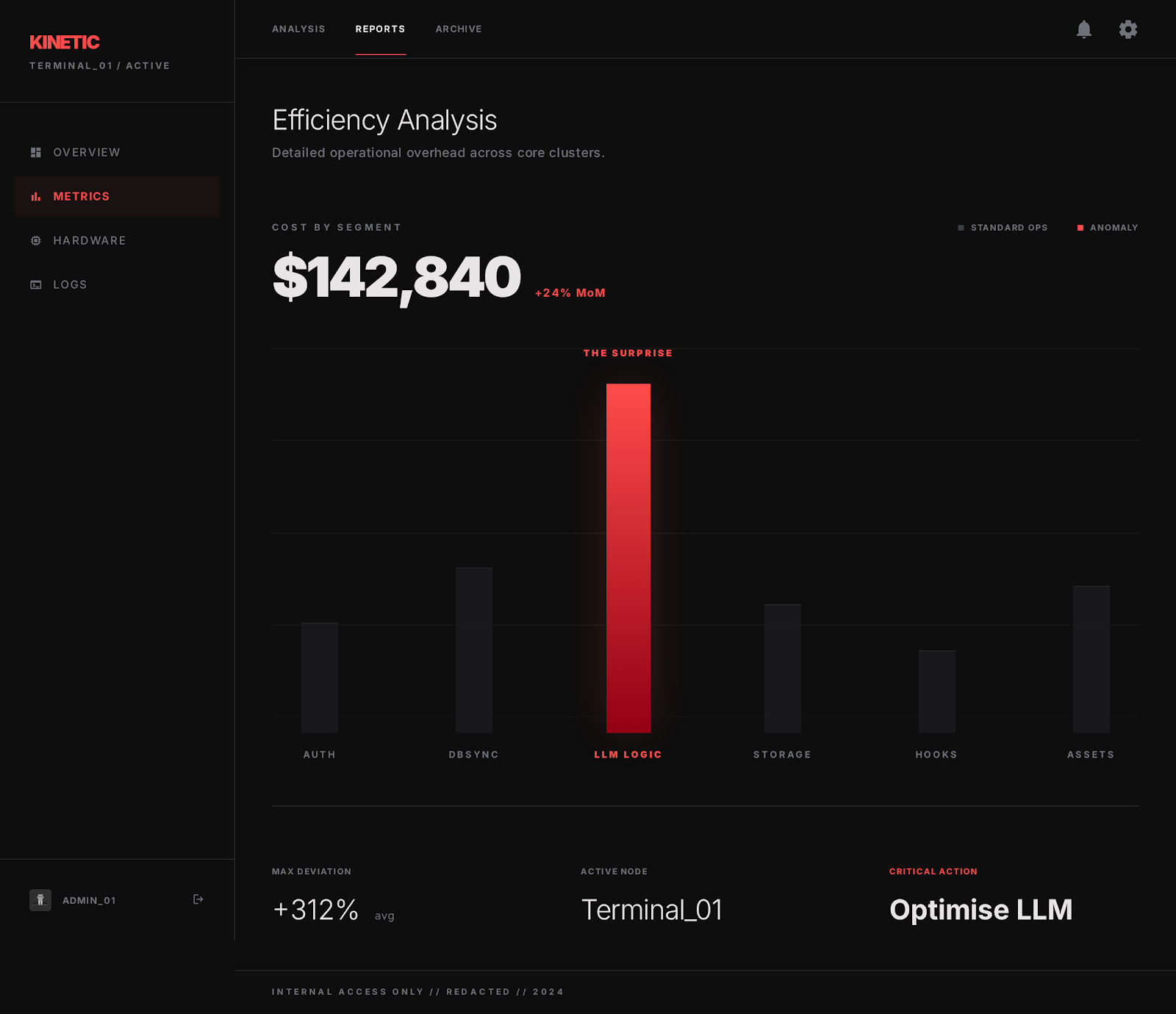 A cost-by-feature view where one unexpectedly expensive endpoint stands out immediately.
Step 1: Caching - The Highest-Immediate-ROI Move
Why LLM Caching Is Different From Regular Caching
If you've done web development, you know about caching. Database query caches, CDN edge caches, Redis for session data - standard stuff. LLM caching builds on the same principles but has some unique wrinkles that make it simultaneously more powerful and slightly trickier to implement well.
The power: LLM inference is expensive and relatively slow. A single API call can cost anywhere from fractions of a cent to several cents depending on the model and prompt length, and take one to several seconds. If you can serve the same result from a cache in under 100 milliseconds at near-zero marginal cost, the economics are brutal in your favor.
The wrinkle: user inputs aren't perfectly identical the way a SQL query to a product table might be. "How do I return an item?" and "What's your return policy?" are two different strings - but they're asking the same thing. A naive exact-match cache misses this entirely.
This distinction leads to the two main caching strategies, which you should almost certainly combine:
Exact Match Caching
Straightforward: store the (normalized input + system settings) → response mapping. When the same input comes in, serve the stored response.
This works extremely well for:
- Template-driven prompts: classification tasks, extraction tasks, or any feature where the prompt structure is fixed and only small variable inputs change predictably
- High-traffic Q&A: if your product has a knowledge base with common questions, exact-match cache hit rates can be surprisingly high
- Idempotent generation: any case where users re-query the same thing (think: dashboards, recurring reports, document summaries that don't change)
The key implementation detail is normalization. Before you hash and cache, strip whitespace variations, normalize Unicode, lowercase where semantically safe. Small input surface differences that don't change the semantic meaning should map to the same cache key.
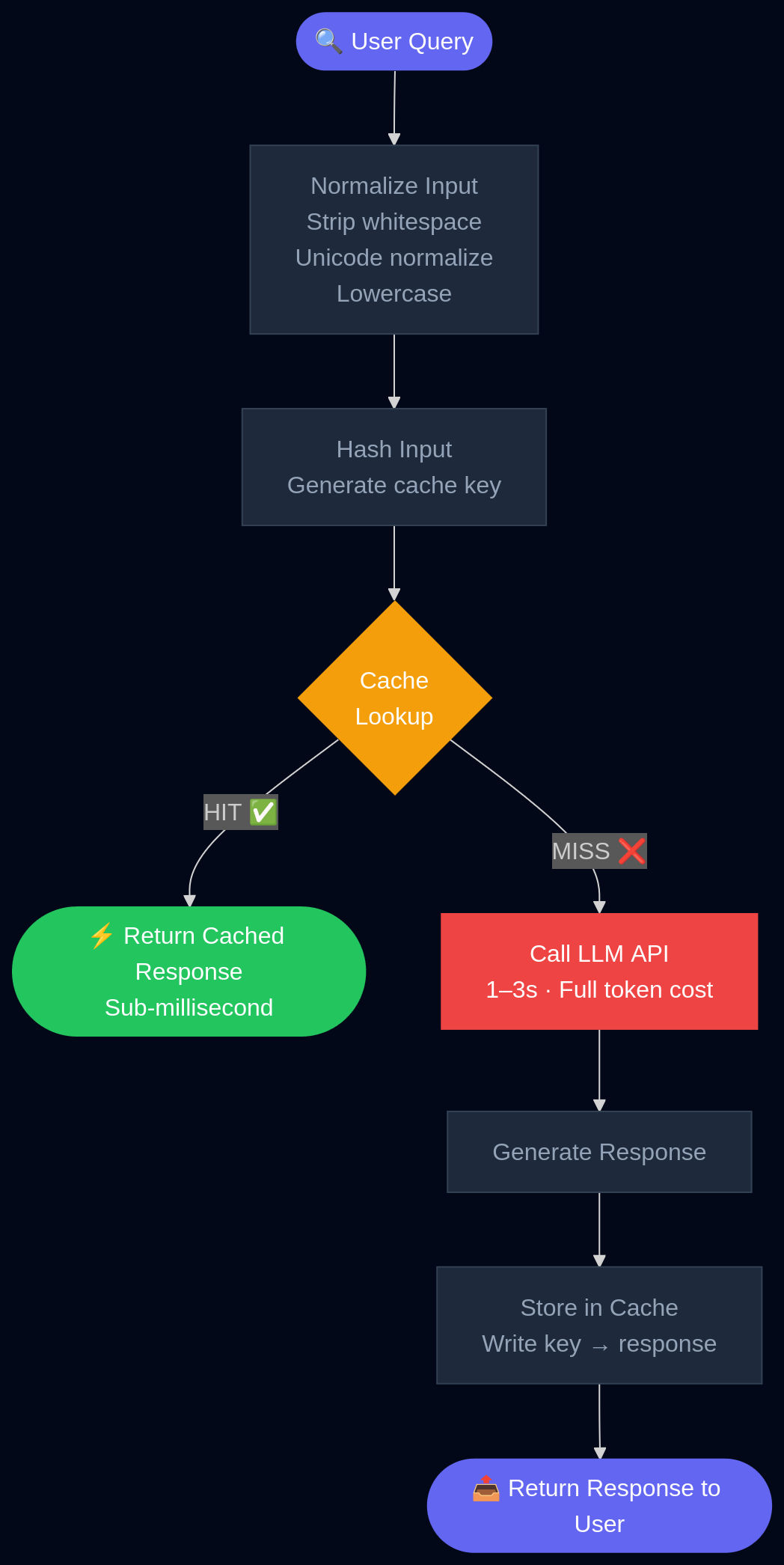 A simple exact-match cache flow: normalize the query, check the cache, and only call the model on a miss.
Semantic Caching
This is where it gets genuinely clever. Instead of matching on the exact string, you embed the user query and compare it to embeddings of previously cached queries. If the cosine similarity exceeds a threshold, you return the cached response.
"How do I get a refund?" and "Tell me about your returns process" - same embedding neighborhood, same cached answer.
In support-chat and customer-facing Q&A workloads, this can dramatically increase effective cache hit rates because real users don't phrase things the same way twice. One production deployment reported a 47% spend reduction combining semantic caching with budget-aware routing. Another case study reported a 34% monthly LLM cost reduction from prompt caching alone, with provider estimates suggesting up to 90% savings in workloads with high query overlap.
The implementation is more complex than exact-match, but the building blocks are all off-the-shelf:
- An embedding model (small and fast - you don't need GPT-4 to embed a support query)
- A vector store for similarity lookup (Pinecone, Weaviate, pgvector if you're already on Postgres)
- A similarity threshold you tune empirically per use case (typically 0.92–0.97 cosine similarity, depending on how sensitive your outputs are to input variation)
The threshold is actually the most important tuning parameter. Too low, and you serve wrong cached answers for queries that aren't really the same thing. Too high, and you get no benefit over exact matching. Spend time here. A/B test with a human eval sample.
Layered Caching
If your system does RAG (Retrieval-Augmented Generation), multi-step tool use, or multi-turn reasoning, you have multiple points in the pipeline where caching can apply - not just the final model call.
- Retrieval results: the chunks you pull from your vector database for a given query can be cached. If 40% of your queries semantically cluster around the same few topics, you'll retrieve the same top-K chunks repeatedly. Cache them.
- Intermediate tool outputs: if your agent calls external APIs, those results can be cached on their own TTL
- Final model responses: as above
Think of your pipeline as a series of expensive computations. Each one is a caching opportunity. Industry guides emphasize that this layered approach avoids recomputation across the entire RAG and tool-calling stack, not just the generation step.
Real Numbers and What to Expect
Based on published case studies and what I saw in production:
| Workload Type | Expected Cache Hit Rate | Estimated Cost Reduction |
|---|---|---|
| High-overlap Q&A / Support | 40-70% | 50-80% |
| RAG over stable documents | 20-50% | 20-50% |
| Conversational, general-purpose | 10-25% | 10-30% |
| Highly personalized / dynamic | <10% | <15% |
AWS estimates that effective caching can cut model serving costs by up to 90% in ideal conditions and delivers sub-millisecond response times on cache hits versus one to three seconds for live LLM calls. Even in the pessimistic scenario, you're almost certainly getting meaningful savings with minimal quality risk, since you're returning the same responses - there's no quality degradation from a cache hit.
In my system, after implementing both exact and semantic caching, the cache hit rate settled at around 38% of total requests, yielding approximately ~29% reduction in token spend at this step alone. Not 80% - it was a moderately personalized product with some dynamic context - but substantial and with zero user-facing quality change.
Step 2: Prompt Compression - Trimming the Fat Your Prompts Didn't Know They Had
Here's the uncomfortable truth about production prompts: they are almost always longer than they need to be.
Not because you're bad at your job. Because prompts evolve organically. You start with something clean. Then there's an edge case, so you add a clarification. Then a user complains about a format, so you add an instruction. Then a new feature gets bolted on and the system prompt grows to absorb it. Six months later you have a 2,000-token system prompt that has three redundant instructions about output format, includes context that's only relevant to 5% of queries, and contains two paragraphs of placeholder language from the original template that nobody deleted.
Token cost scales directly with prompt length. Every unnecessary token is money you are lighting on fire.
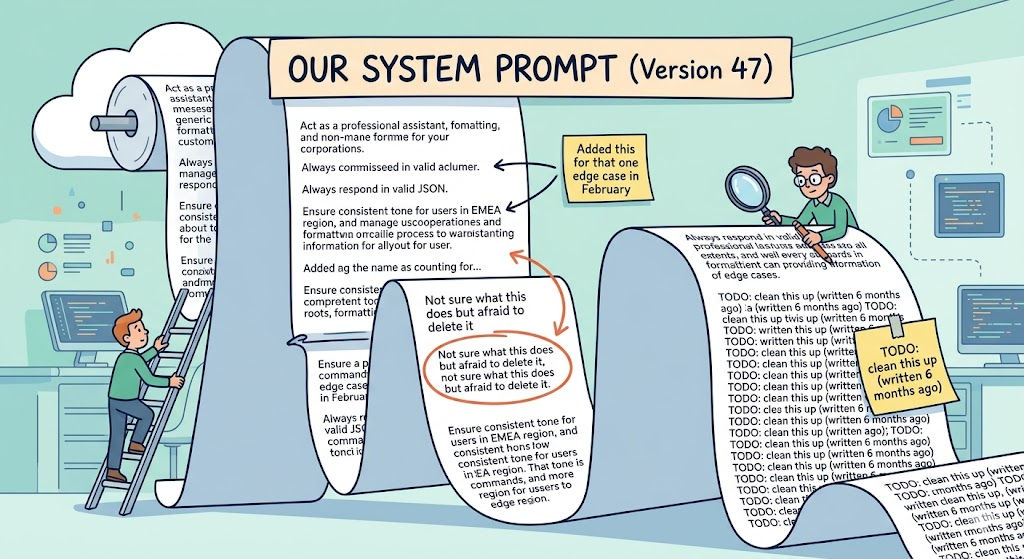 A slightly painful but familiar sight: the bloated system prompt that grew one edge case at a time.
What Prompt Compression Actually Means
There are two broad families of approaches, and they're worth understanding even if you only use the simpler one:
Hard prompt compression operates on the text itself. You prune tokens, sentences, or sections that carry low information content. This can be as simple as a human editing pass, or as sophisticated as running a smaller model to score the importance of each sentence and automatically drop low-scoring ones. The prompt your LLM actually sees is a shorter version of the original.
Soft prompt compression is more exotic: you train a small encoder model to compress a long prompt into a small number of continuous "virtual tokens" - dense embeddings that pack more semantic information per token than natural language. The LLM consumes these compressed representations instead of the full text. This is powerful but requires ML infrastructure and is harder to debug.
For most production applications, hard compression is where you start. The gains are real, the implementation is tractable, and you don't need to touch model weights.
LLMLingua: The Academic State of the Art You Should Know About
Microsoft Research published LLMLingua, which has become the canonical reference for serious prompt compression. The approach is elegant:
- Take a small, cheap language model (something like GPT-2-small or a 7B parameter model)
- Use it to score the "importance" of individual tokens in your prompt - specifically, by measuring how much each token contributes to the model's ability to reconstruct or predict the rest of the sequence
- Prune low-importance tokens, applying tighter compression to demonstration examples and looser compression to core instructions
On benchmarks including GSM8K (mathematical reasoning), BBH (complex instruction following), and summarization tasks, LLMLingua achieved up to 20x compression while largely preserving task performance. 20x. That's a 2,000-token prompt becoming a 100-token prompt.
Now, 20x is the headline number from favorable benchmark conditions - in production with messier prompts and more varied tasks, you should expect compression ratios more like 2–5x, which is still transformational. A 3x compression ratio on your prompts is a 67% reduction in input token costs on the compressed portion, which compounds with everything else in the stack.
You can access LLMLingua's implementation through the Microsoft Research GitHub. For a more lightweight approach that doesn't require running a separate model, there are also rule-based compression pipelines that can get you 30–50% reduction just from:
- Removing redundant whitespace and formatting artifacts
- Deduplicating repeated instructions (you'd be surprised)
- Stripping boilerplate that doesn't affect behavior
- Truncating retrieved context to a maximum-relevance budget rather than a maximum-token budget
RAG-Specific Compression
If you're doing RAG, prompt compression deserves special attention because retrieved context is often the biggest contributor to prompt length - and often the most redundant.
Standard RAG: retrieve top-K chunks by similarity, concatenate them all, send to the model. If K is 5–10 and each chunk is 200–400 tokens, your context alone is 1,000–4,000 tokens before you've even included the system prompt or conversation history.
Better approach:
- Relevance-budget retrieval: don't retrieve a fixed K, retrieve until you hit a relevance threshold. If the 3rd chunk has a cosine similarity of 0.71 and your threshold is 0.80, don't include it.
- Cross-chunk deduplication: chunks from the same document often overlap significantly. Deduplicate at the sentence level before including.
- Chunk compression: for included chunks, summarize or extract the specifically relevant sentences rather than including the full chunk.
This alone, implemented as a preprocessing step in the RAG pipeline, reduced average prompt length by ~31% on queries that triggered retrieval - which was the majority of traffic. Combined with the caching layer, this is where the savings really started to compound.
Compression Results
After implementing a multi-stage prompt preprocessing pipeline - manual audit and cleanup of system prompts, relevance-budget retrieval for RAG, and a basic sentence-level deduplication pass - average prompt length dropped by 41% across the board. This translated directly to token cost savings of the same magnitude on the input side.
For output tokens: compression doesn't help directly, but cleaner, shorter prompts often produce more concise, well-structured outputs too. I also saw a secondary reduction of about 12% in average output length, which I attribute partly to less confusing context and partly to being more explicit in the compressed prompts about desired output format.
Net from prompt compression: approximately ~18% reduction in total API cost (after accounting for the caching layer already applied).
Step 3: Model Routing - Stop Using a Ferrari for Every Errand
This is the part that, once you understand it, will make you look at your API logs and wince.
Here's the thing about frontier models: they are extraordinary for hard problems. Nuanced reasoning, complex code generation, synthesis across long documents, tasks that require deep world knowledge - GPT-4 class models are genuinely impressive at these. Worth the price.
Here's the other thing: the majority of requests in most production systems are not hard problems.
"Classify this support ticket as billing, technical, or general inquiry." You are not paying for a frontier model's ability to write iambic pentameter here. You're paying for a 20-token classification that a 7B parameter model can do just as well, faster, and at 1/50th the cost.
"Extract the date, amount, and vendor name from this receipt." Again: not hard. The frontier model you're using can do it perfectly. So can a model that costs dramatically less.
"Summarize this 3-sentence user message." Please.
Model routing is the infrastructure that automatically directs each incoming request to the appropriate model on the cost-quality spectrum, instead of defaulting everything to your most expensive option.
The Economics Are Staggering
Let's make this concrete. As of 2025-2026 pricing:
- Claude Haiku / GPT-nano class models: fractions of a cent per 1K tokens
- Mid-tier models: a few cents per 1K tokens
- Frontier models (GPT-4o, Claude Sonnet/Opus, Gemini Ultra): significantly higher
If 60% of your requests are genuinely simple tasks that a small model handles perfectly, and you route those to a cheap model, you're reducing your per-request cost on that 60% by 80–95%. A 2026 overview of AI model routers found that companies using intelligent routing reduce costs by 30–85% while maintaining or improving output quality. The same research highlighted that in RAG setups specifically, routing reduces costs by 27–55% by directing simple queries to efficient models.
The quality maintenance claim is important: routed systems often outperform single-model systems because you're also sending hard queries to better models than your average, since the cheap traffic has been siphoned off.
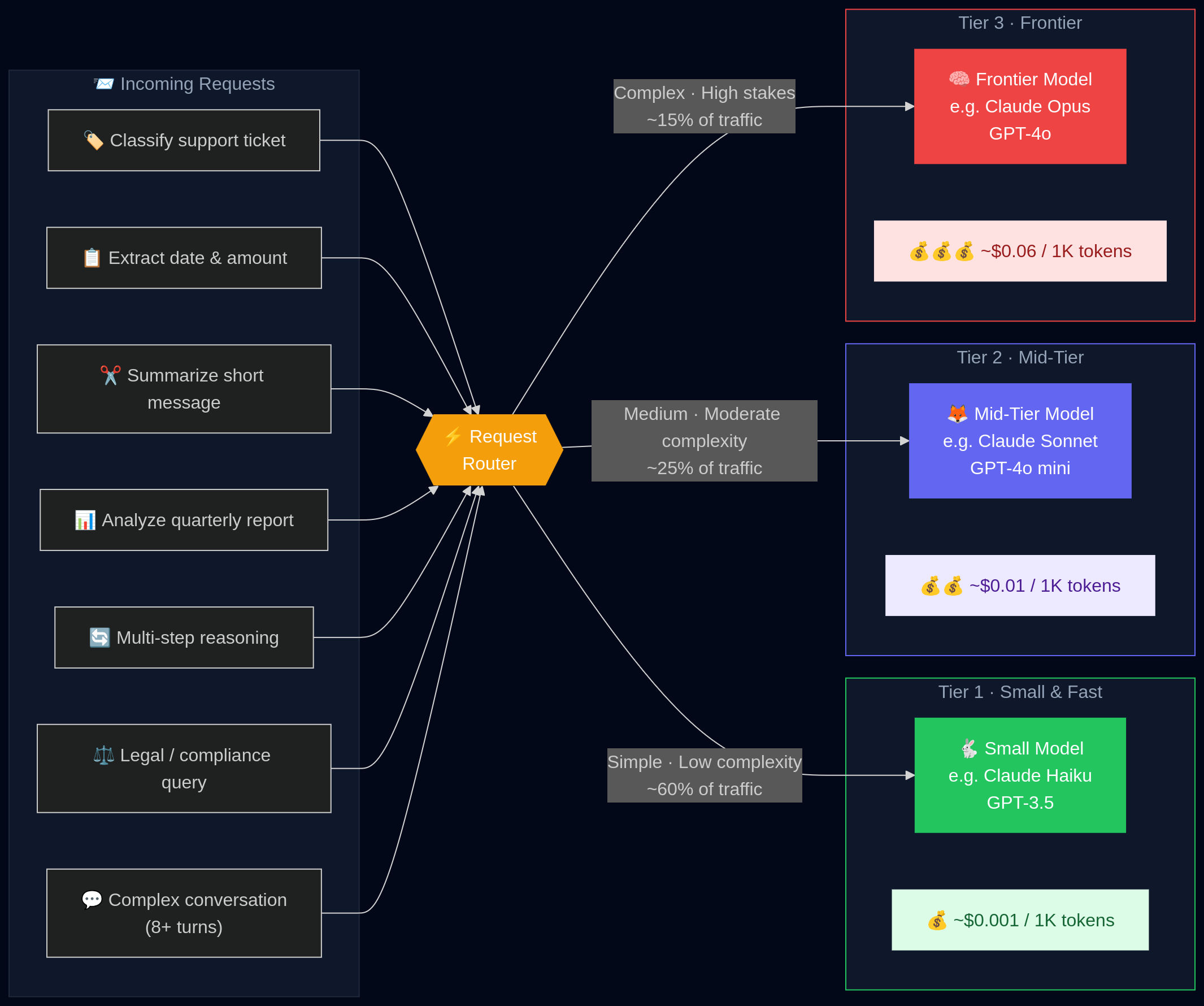 A routing layer that sends simple requests to cheap models and reserves the expensive ones for harder tasks.
Three Tiers of Routing Strategy
Tier 1: Static Rule-Based Routing
The simplest version, and often good enough to start. You define routing rules based on request characteristics:
if endpoint == "/classify" → use small model
if endpoint == "/summarize" and context_length < 500 → use small model
if endpoint == "/generate_report" → use frontier model
if intent in ["billing_lookup", "order_status"] → use small model
if intent in ["complaint_escalation", "legal_inquiry"] → use frontier model
This is easy to implement, easy to debug, and the routing decision adds essentially zero latency. The downside is you need to maintain the rules manually and they don't adapt to novel request types.
Tier 2: Heuristic / Metrics-Based Routing
More dynamic rules based on measurable signals:
if user_tier == "free" → cap to mid-tier model
if conversation_depth > 10_turns → upgrade to frontier model
if query_complexity_score < threshold → use small model
Query complexity scoring can be done with a simple heuristic (sentence count, vocabulary diversity, presence of reasoning keywords like "explain why" or "analyze") or with a very small classifier model trained on your own labeled data.
Tier 3: Learned Routing
This is where the research gets genuinely impressive. Academic work on systems like xRouter demonstrates that training a cost-aware routing model - one that learns to predict which downstream model will deliver acceptable quality for each request, penalizing routing to expensive models - can reduce inference cost by up to 80% while maintaining near-optimal task performance.
The intuition: you're learning the decision boundary between "small model will do fine" and "you actually need the big one" from your own task distribution. Over time, with feedback on output quality, the router gets better.
For most teams, Tier 1 or Tier 2 is the right starting point. Tier 3 requires labeled data, model training infrastructure, and ongoing monitoring. Start with rules, graduate to learned routing when you have enough data and the problem is big enough to justify the complexity.
Routing in Practice
I started with pure rule-based routing by endpoint. This alone moved 52% of traffic to cheaper models, immediately cutting costs on that traffic by ~80%.
Then I added conversation-depth heuristics: queries coming in after more than 8 turns of conversation were upgraded regardless of intent type, since longer conversations tend to accumulate context and complexity that benefits from better reasoning.
Finally, I added a small intent classifier (fine-tuned from a compact open-source model on a labeled query dataset) to route within endpoints where the complexity varied enough to matter.
Net result: ~31% of total remaining API cost reduced through routing after the caching and compression layers.
Important: Routing Requires Evaluation Infrastructure
This is the part people skip and then get burned by. When you start routing different request types to different models, you need to verify that the quality you're assuming you're maintaining is actually there.
You need:
- Offline evaluation: a labeled test set for each major task type, with quality metrics you can run against all models in your router before deploying
- Online monitoring: production sampling that checks output quality on routed responses, watching for quality regressions as your traffic distribution shifts over time
- Fallback logic: when the small model returns a response below a quality threshold (maybe detected by a quick quality-check pass), fall back to the frontier model
The fallback in particular is important and often overlooked. A well-designed routing system with fallback can give you most of the cost savings with essentially none of the quality risk, because the cases where cheap models fail get quietly escalated.
Putting It All Together: The Stack
Here's the complete architecture I ended up with, from a request arriving to a response being returned:
Layer 1: Normalization - strip whitespace, Unicode normalize, lowercase where safe
Layer 2: Exact-match cache lookup - Redis, sub-millisecond
Layer 3: Semantic cache lookup - vector similarity, ~10–20 ms
Layer 4: Prompt compression - boilerplate removal, context dedup, relevance budgeting
Layer 5: Model router - rule-based + intent classifier
Layer 6: LLM call - to whichever model tier the router selected
Layer 7: Quality check - lightweight output validation; trigger fallback if below threshold
Layer 8: Cache write - store response with both exact-match and semantic keys
Layer 9: Return - to the user
End-to-end, this stack adds approximately 25–40 ms of latency on cache misses and essentially zero ms on cache hits (which actually makes those requests much faster than before). The overall effect on latency was positive - average response time fell by about 40% because (a) cache hits are nearly instant, and (b) most traffic now hits faster, cheaper models.
The Compounding Effect: Why 67%?
Each lever independently moved the needle. But the combination compounded:
| Optimization | Monthly Cost Before | Reduction Applied | Monthly Cost After |
|---|---|---|---|
| Baseline (no optimization) | 100% | - | 100% |
| After caching | 100% | ~29% | 71% |
| After prompt compression | 71% | ~18% further | 58% |
| After model routing | 58% | ~31% further | 40% |
| Final state | 100% | ~60% | ~40% |
(Note: percentages above are multiplicative, not additive. A 29% reduction on 100% leaves 71%, then an 18% reduction on 71% takes you to 58%, and so on.)
The actual measured reduction was 67% - slightly better than this simplified model because semantic caching and routing interacted favorably (the semantic cache handled more traffic once prompts were normalized and compressed, improving its hit rate).
The quality outcome: in three months of running this stack with active monitoring, the user satisfaction metric (measured via session thumbs-up/down and task completion rate) did not statistically change. The product felt faster to users and cost 67% less to run.
What I Got Wrong (Briefly)
In the interest of honesty:
I set the semantic cache similarity threshold too low initially. At 0.88 cosine similarity, I was occasionally serving cached responses to queries that were similar but not identical enough. A user asking "How do I cancel my subscription?" got a cached answer to "How do I pause my subscription?" - technically related, semantically wrong. Pushing the threshold to 0.94 made the problem disappear.
I didn't account for staleness in the exact cache. A cached response from three months ago answering "What are your current pricing plans?" is actively harmful if pricing has changed. I had to add TTL logic and invalidation hooks tied to content updates. Don't cache things that have time-sensitive correctness requirements without TTL.
I trusted the cheap model too much on some routed tasks. The small model handled classification and extraction perfectly. It handled nuanced, multi-step tasks less perfectly. I had to revisit the routing rules to be more conservative about what went to the small model - specifically, anything involving multi-turn reasoning or tasks requiring synthesis across more than a couple of pieces of information.
None of these were catastrophic. All of them were caught by monitoring. This is why the evaluation/monitoring infrastructure is not optional.
Quick-Start Checklist
If you're ready to start and want a prioritized list:
Week 1: Observability
- Instrument all LLM calls with token counts, model, latency, and cost
- Break down costs by feature/endpoint
- Identify your top 3 cost contributors
Week 2–3: Caching
- Implement exact-match cache for your highest-volume, lowest-variance endpoints
- Add semantic cache for support/Q&A workflows using embeddings + vector store
- Set up cache hit rate monitoring
- Add TTL for time-sensitive content
Week 3–4: Prompt Compression
- Audit your system prompts for redundancy - manually, first
- Implement relevance-budget retrieval for RAG endpoints
- Add cross-chunk deduplication
- Measure average prompt length before/after and track it as a metric
Week 4–6: Model Routing
- Define task tiers in your system (simple / medium / complex)
- Implement rule-based routing by endpoint first
- Run offline quality evaluation on each model tier against your task types
- Add fallback logic before going to production
- Deploy, monitor, iterate
Resources and Further Reading
- LLMLingua (Microsoft Research) - the canonical prompt compression paper. The GitHub repo has usable implementations.
- AWS guide on LLM caching - excellent on cache design, eviction strategy, and measuring hit rates
- Maxim AI / Bifrost guide - practical breakdown of semantic caching implementation and routing architecture
- xRouter paper - if you want to go deep on learned routing with cost-aware optimization
- Anthropic and OpenAI pricing pages - check current prompt caching discount rates; both providers now offer reduced rates for cache-hit tokens at the API level, which stacks on top of application-level caching
Final Thought
LLM cost optimization is fundamentally a systems engineering problem, not an AI problem. You don't need new models, new algorithms, or a PhD. You need instrumentation, redundancy elimination, and intelligent request routing - all things that software engineers have been doing in other contexts for decades.
The specific numbers will vary for your workload. Your cache hit rate depends on how repetitive your traffic is. Your compression ratio depends on how bloated your prompts are. Your routing savings depend on how much of your traffic is actually simple.
But the direction is consistent across every case study I've seen: these three levers, applied in combination with proper evaluation guardrails, produce 30–70%+ reductions with no user-facing quality loss. The only question is how much you've been leaving on the table while not applying them.
Go check your billing dashboard. Then go build the thing.
If you found this useful, I write about building AI products in production - the engineering, the economics, and the parts that don't get talked about in the hype cycle. Feel free to share or reach out with questions.